Chapter 2
The map screen
Almost everything happens on one screen: the map, with a column of buttons down each side. This chapter is a tour of that screen. The buttons themselves (the rails) have their own chapter, Every rail button.
2.1What you see on the map
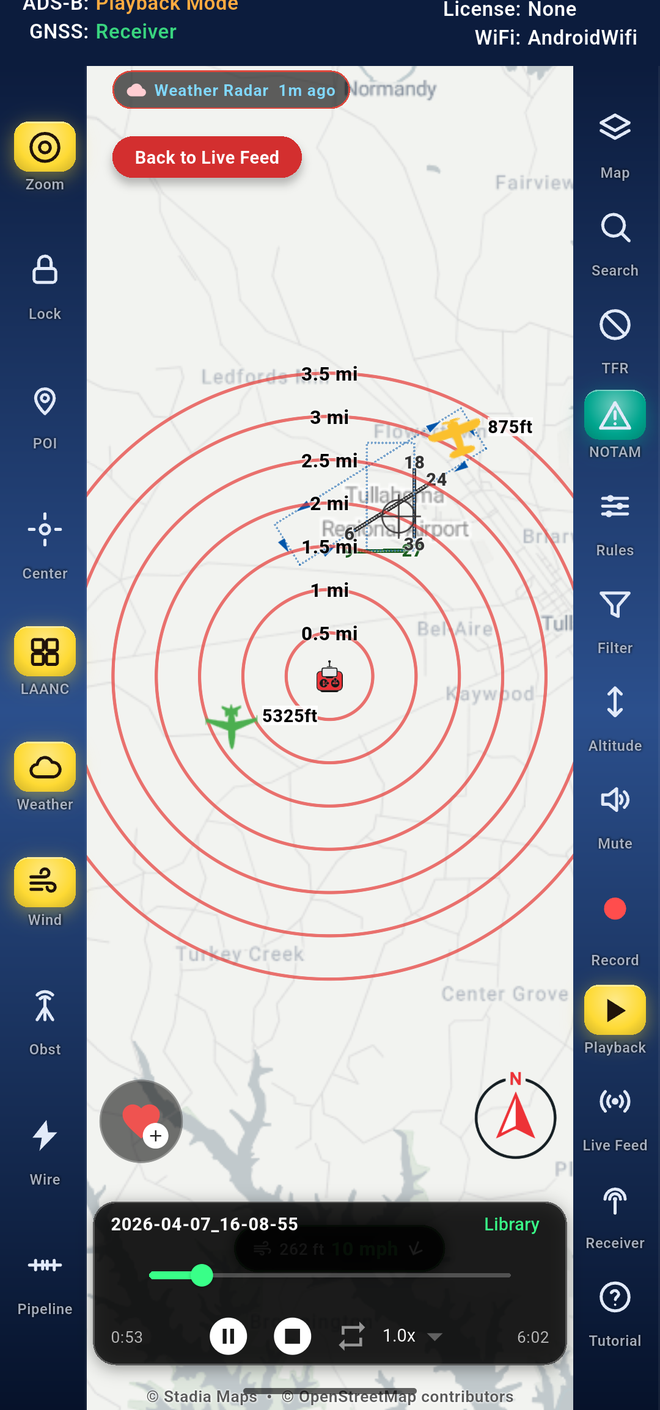
From top to bottom:
- The status bar across the top tells you where traffic is coming from, where your position comes from, your license and your connection. See The status bar.
- The rails: a column of buttons on the left and another on the right. Each one opens a feature or switches a map layer on and off. A button shows a yellow background when its feature is on.
- The range rings are centered on your position (or your point of interest) and labeled in miles, so you can judge distance at a glance.
- Your position is the icon at the center of the rings.
- Traffic: each aircraft is drawn with its altitude next to it. Drones get their own icons. Colors come from your alert rules, so the color tells you how close and how high a target is. See Alert rules for aircraft.
- The weather chip at the top left, for example Weather Radar Live, shows that the radar layer is on and how fresh it is. During lightning it also shows the nearest flash. See Weather radar.
- Bottom left, the red heart is for your favorite locations.
- Bottom right, the compass shows which way is up on the map. Long-press it to arrange the rail buttons (Arrange the rail buttons).
During playback you also see the Back to Live Feed button at the top and the playback controls along the bottom. See Play back a recording.
2.2The status bar
The two lines across the top of the map answer four questions:
| Label | What it tells you | Examples |
|---|---|---|
| ADS-B: | Where traffic comes from right now | Hotspot WiFi, BLE-8FA1 (Bluetooth to receiver 8FA1), Playback Mode |
| GNSS: | Where your position comes from | Receiver, Phone/Tablet |
| License: | Your license for live traffic | Licensed, None |
| Connection: or WiFi: | The link to the receiver | the WiFi network name plus BLE when Bluetooth is standing by |
The order of Connection: matters: the first name is the link carrying traffic right now. HomeRouter+BLE means WiFi (a network called HomeRouter) is carrying it, with Bluetooth standing by. BLE+HomeRouter means Bluetooth is carrying it while WiFi reconnects, for example just after the receiver restarts.
If something looks wrong on the map, read this bar first. It usually tells you why: no receiver, the wrong network, or a recording still playing.